document-mhs-cornwellwill
Download

[Page 1]
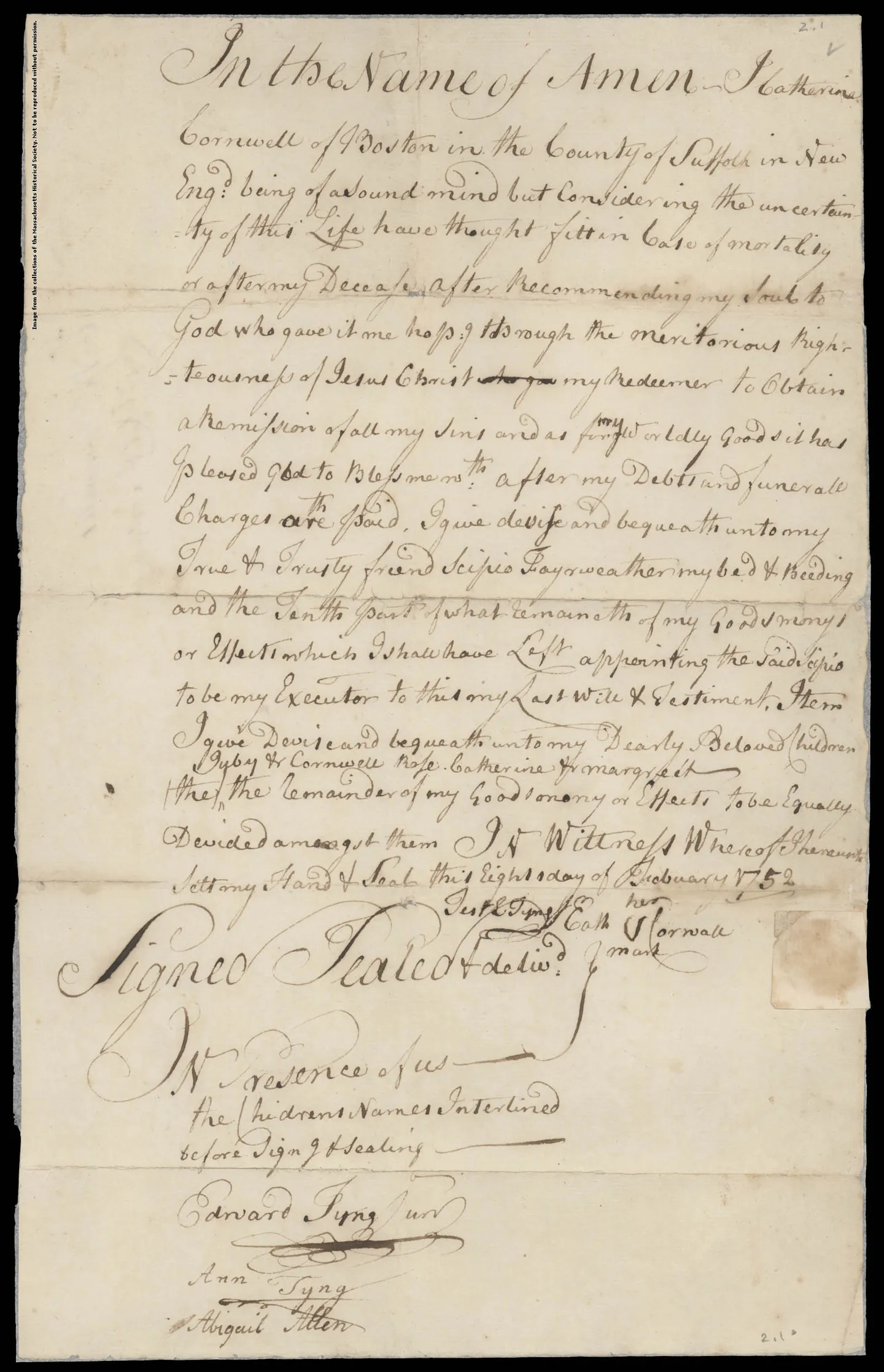
In the Name of Amen -- I Catherine Cornwell of Boston in the County of Suffolk in New Engd: being of a Sound mind but Considering the uncertainty of this Life have thought fitt in Case of mortality

or after my Decease after Recommending my Soul to God who gave it me hop:g through the meritorious Righteousness of Jesus Christ who gav my Redeemer to Obtain a Remission of all my Sins and as for my Worldly Goods it has Pleased God to Bless me wth: after my Debts and funerall

Charges are th paid, I give devise and bequeath unto my True & Trusty friend Scipio Fayrweather my bed & Beeding and the Tenth part of what remaineth of my Goods monys or Effects which I shall have Left appointing the said Scipio to be my Executor to this my Last will & Testiment, Item

I give devise and bequeath unto my Dearly Beloved Children (the) Juby & Cornwell Rose. Catherine & margreet the remainder of my Goods mony or Effects to be Equally Devided amongst them IN Wittness Whereof I hereunto Sett my Hand & Seal this Eighth day of February 1752

Test E Tyng
Cath Corwall
her mark
[A symbol representing her "mark" is jotted here.]

Signed Sealed & delivd:
In Presence of us -- }
the Childrens Names Interlined
before Signg & sealing --
Edward Tyng Junr
Ann Tyng
Abigail Allen

[Page 2]
[Endorsement]
Cathe: Corwall s
Last Will & Testiment

Simplified text and excerpts coming soon!

How it Works

  • Styled Layouts
  • Editing & Formatting
  • Exporting & Sharing
  • Student Supports
  • Add Functions

Welcome

Before you dive in, let's walk through the core features that make history.org teacher-first. Each section will show you the tools you need to build inquiry and inspire curiosity through primary source content and context.

  • Click into text to start editing.

    Simplify language for struggling readers, emphasize words to grab students' attention, or add details for advanced learners.

  • Click and drag to rearrange information.

    Easily build the flow that works for your students, your pacing, and your style.

  • Add more content to the page.

    From text blocks to source hints to related videos - content additions give you control over what your students see and let you add tools to support their learning.

  • Build from our Leveled Library.

    When available, mix and match provided questions and vocab from our library to inspire curiosity.

  • Switch to Style Mode and customize the look.

    Customize how your students see content — bigger text, delightful design elements, focused layouts — it’s your call.

  • Keep the source in sight with Side-by-Side Page Display.

    No more scrolling up to check the original source — with side-by-side display students can read, reference, and respond without losing their place.

  • Set custom layouts for questions and vocabulary.

    From classic lists to more focused tabs, even flash cards to showcase one item at a time – choose the style that fits your classroom best.

  • When you're ready, instantly share or export.

    In just one click get a share-ready link for your students or export your customized materials.

  • Customized pages live in your workspace.

    Organize your content with folders, or easily make copies of any customized page for additional changes to differentiate and meet individual students' needs.

Select an option
  • 1 of 9: Edit & Format
  • 2 of 9: Rearrange
  • 3 of 9: Add Actions
  • 4 of 9: Library Adds
  • 5 of 9: Switch Modes
  • 6 of 9: Page Displays
  • 7 of 9: Section Styles
  • 8 of 9: Export & Share
  • 9 of 9: Profile & More

    Now, start customizing!

    You've explored the features and functions available to you. The right sources, the right collections, and the right content are already waiting for you. Go make history!


    • Edit, Format, Rearrange & Add Content
    • Switch Modes at Any Time
    • Style with Page & Section Layouts
    • Get it to Class with Exporting & Sharing
    • Find Customized Pages in Your Profile